Queues with One Stack using Recursion and Generating Recursive Fractal Melodies

Continuing with the discussion of interchanging stacks and queues, I want to dive into how to implement a queue with one stack. This implementation is a little tricky because it requires recursion. Recursion is an important computer science concept that is used in many divide-and-conquer strategies to solve hard problems. Recursion occurs when a function calls itself. To prevent having an infinite loop, every recursive function has a base case and a recursive case. The base case tells when to stop recursing and calling itself again. It’s usually some kind of if statement with the stopping condition and is the simplest version of the problem that you can solve directly without recursing further. The recursive case is the function calling itself.
Learning Data Structures and Algorithms with Music is a reader-supported publication. To receive new posts and support my work, consider becoming a free or paid subscriber.
The neat thing about recursions is its relationship to stacks. Recursions use stacks to do the work. They are called call stacks, where computers use stacks internally to keep track of function calls. When you call a function, Python pushes information about that call (parameters, local variables, where to return to, etc) onto the stack, called “stack frames.” When the function finishes, it pops that information off. The key to implementing a queue using a stack is to simulate the call stack. Here’s the approach for dequeue():
Recursively pop items until you reach the bottom of the stack
Return that bottom item (the first one enqueued)
As the recursion unwinds, push the other items back
Let’s do an example. Say you have a queue with [1, 2, 3], where 1 was the first item enqueued and 3 was the last item enqueued.
First call: Pop 3 → stack is [1, 2], call dequeue() recursively
Second call: Pop 2 → stack is [1], call dequeue() recursively
Third call: Only 1 item left, pop 1 and return it → stack is []
Now the recursion unwinds:
Second call resumes: Push 2 back → stack is [2], return 1
First call resumes: Push 3 back → stack is [2, 3], return 1
Final result: stack is [2, 3] and you returned 1.
So 1 gets removed in the deepest recursive call (the base case), and 2 and 3 get pushed back as the recursion unwinds. 1 is what we want to remove since it’s the first item that was added to the queue. Why is there this unwinding process? Recursion unwinds because each function call must eventually finish and return to whoever called it. It is similar to a stack of paused tasks:
First call pauses and waits for the second call to finish
Second call pauses and waits for the third call to finish
Third call completes and returns a value
Now the second call can resume, finish its work, and return
Finally, the first call can resume, finish its work, and return
The unwinding happens automatically - once a function returns, control goes back to the line right after where it was called.
    def enqueue(self, item):
        self.stack.append(item)

    def dequeue(self):
        if self.is_empty():
            raise IndexError("Sorry, your queue is empty")
        else:
            if len(self.stack) == 1:
                return self.stack.pop()
            else:
                save_element = self.stack.pop()
                save_recursion = self.dequeue()
                self.stack.append(save_element)
                return save_recursion
The enqueue() function is straightforward, just append() the item. For the peek() function, we need to use recursion again for the same reason as dequeue(), because we want the first element of the queue. Instead of using the dequeue() function for the recursion, we use the peek() function.
    def peek(self):
        if self.is_empty():
            raise IndexError("Sorry, your queue is empty")
        else:
            if len(self.stack) == 1:
                return self.stack[0]
            else:
                save_element = self.stack.pop()
                save_recursion = self.peek()
                self.stack.append(save_element)
                return save_recursion
How did we know to use a stack in a recursive manner for a queue? The main giveaway here is that we need to reverse and access the “other end”. Recursion lets you reach the bottom of something, which is the stack here. In practice, the two-stack approach is more common because it’s more efficient as it’s O(1) amortized, while the one-stack approach is O(n).
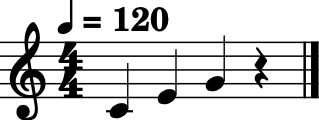
We can implement a recursive algorithm in music using stacks, queues, and recursion. Fractal melodies can be generated using a recursive pattern: you can take a melody, then for each note, replace it with a smaller version of the whole melody (transposed to that note’s pitch). This creates self-similar musical structures. For instance, let’s say you have a basic melody like [C, E, G] (three notes). A fractal approach would replace each note with a scaled version of the whole pattern. If we replace C with [C, E, G] (starting at C), then E with [E, G#, B] (starting at E), and so on, we get a longer, self-similar melody. Pretty cool, huh?
We’ll start by representing notes in MIDI to work with numbers, like C=60, E=64, G=67, the C major triad. First, we need a function that takes a starting note and creates a pattern. For example, if our base pattern is [0, 4, 7] (the intervals), we can add these to any starting note, like 60.
def create_pattern(start_note, intervals):
    result = []
    for i in range(len(intervals)):
        result.append(start_note + intervals[i])
    return result
Now for the recursive part: we want to replace each note in a melody with a pattern based on that note. Let’s write fractal_melody(melody, intervals, depth) where:
melody is the starting melody
intervals is the pattern to apply
depth controls how many times to recurse (0 = no change, 1 = expand once, etc.)
But we need a base case. The base case is when depth equals 0 and returns the original melody unchanged. For the recursive case, when depth is greater than 0, we want to replace each note in the melody with a pattern. We use depth to control how many more times we’ll expand the melody. Depth = 2 means “expand twice more”, depth = 1 means “expand once more”, and depth = 0 is our base case which means stop expanding. As such, we decrement the depth so that our recursion can reach the base case.
def fractal_melody(melody, intervals, depth):
    if depth == 0:
        return melody
    else:
        result = []
        for i in melody:
            pattern = create_pattern(i, intervals)
            melody = fractal_melody(pattern, intervals, depth-1)
            result.extend(melody)
        return result
We use extend() to add all the individual notes from the recursive result to our list instead of using append(), which would add the whole list as a single element. Let’s trace fractal_melody([60], [0, 4, 7], 2) step by step:
Call 1: melody=[60], depth=2
Loop through [60]:
Create pattern: [60, 64, 67]
Recursively call with ([60, 64, 67], depth=1)
Call 2: melody=[60, 64, 67], depth=1
Loop through each note:
For 60: pattern is [60, 64, 67], recurse with depth=0 → returns [60, 64, 67]
For 64: pattern is [64, 68, 71], recurse with depth=0 → returns [64, 68, 71]
For 67: pattern is [67, 71, 74], recurse with depth=0 → returns [67, 71, 74]
Extend altogether: [60, 64, 67, 64, 68, 71, 67, 71, 74]
Return this
Back to Call 1:
Extend result with that 9-note melody
Return [60, 64, 67, 64, 68, 71, 67, 71, 74]
Let’s start by implementing this recursive algorithm with a stack that matches the recursive behavior. In order to use an explicit stack, you have to manually track what the call stack does automatically. The call stack will store tuples of information for each “call”: the melody to process, the depth, and where you are in processing it. Each tuple represents one “task.” The stack holds multiple tasks, so it’s a list of tuples. Think of it like: the stack is a to-do list, and each tuple is one task with its details bundled together. Here’s the general structure for converting to a stack-based approach:
Initialize a stack with the starting work: [(melody, depth, result_so_far)]
Loop while the stack is not empty:
Pop an item from the stack
If depth is 0 (base case), handle the result
Otherwise, push work for each note in the melody onto the stack
Collect and combine results as you process
The challenge is tracking partial results as we go. We will use the stack to store both the work to do and where to put the results. Here is the implementation:
def fractal_melody_stack(melody, intervals, depth):
    stack =  [(melody, depth)]
    result = []
    while len(stack) > 0:
        current_melody, current_depth = stack.pop(0) # remove from the front like a queue
        if current_depth == 0:
            result.extend(current_melody)
        else:
            for i in current_melody:
                pattern = create_pattern(i, intervals)
                stack.append((pattern, current_depth -1))
    return result
Because we are using a stack to mimic recursive behavior, order matters. The call stack processes recursion in a specific order. When you manually use a stack (LIFO), you get the reverse order, so we use pop(0) to remove from the front to maintain the order. Using a queue (FIFO) would process the tasks in the same order as recursion, so let’s try that implementation. To convert to a queue, we just need to change how we remove items. Instead of pop(), which removes from the end, use popleft(), which removes from the front, making it FIFO, like a queue.
from collections import deque

def fractal_melody_queue(melody, intervals, depth):
    queue = deque([(melody, depth)])
    result = []
    while len(queue) > 0:
        current_melody, current_depth = queue.popleft()
        if current_depth == 0:
            result.extend(current_melody)
        else:
            for i in current_melody:
                pattern = create_pattern(i, intervals)
                queue.append((pattern, current_depth -1))
    return result
A couple of notes before we get to the music. We could actually implement the recursive melody with a stack and not correct for the recursive order by using pop(). If we use a stack, it is the same as a Depth-First Search (DFS) approach, while the queue approach above using popleft() is the same as a Breadth-First Search (BFS) approach. Very cool how stacks and queues are connected to tree and graph search algorithms!
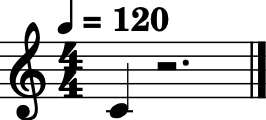
Ok, enough with the coding, let’s hear it! Here are four different fractal melodies, starting with depth = 0 and ending with depth = 4.
# Generate the melodies
melody1 = fractal_melody_queue([60], [0, 4, 7], 0)
melody2 = fractal_melody_queue([60], [0, 4, 7], 1)
melody3 = fractal_melody_queue([60], [0, 4, 7], 2)
melody4 = fractal_melody_queue([60], [0, 4, 7], 3)
- Here is the first fractal:
- Here is the second fractal:
- Here is the third fractal:

- Here is the fourth fractal:
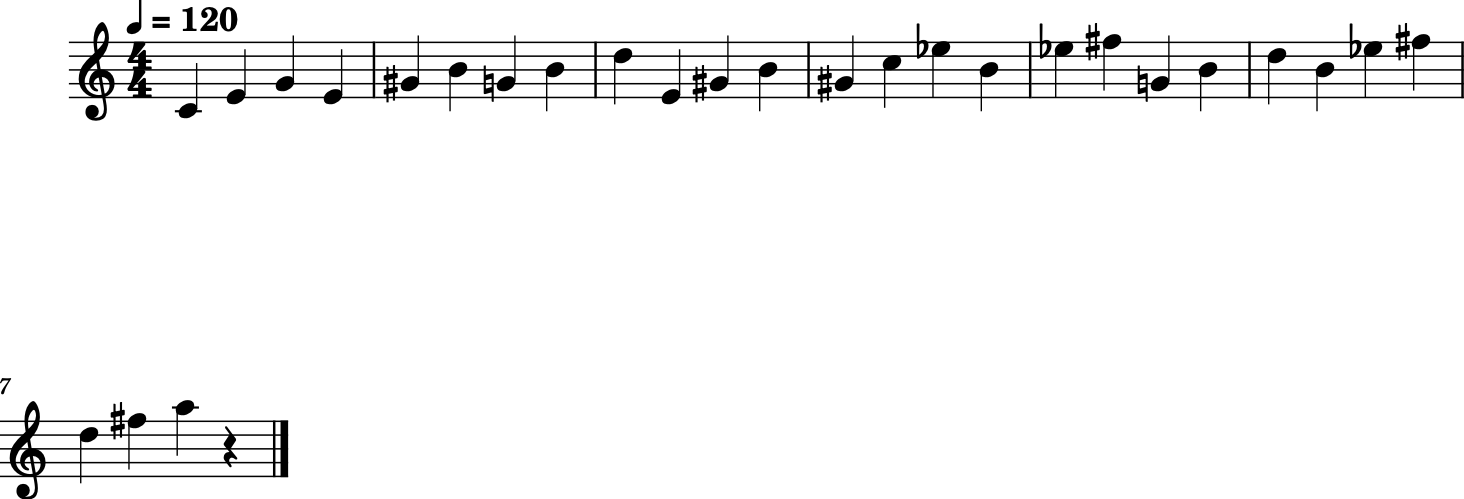
Learning Data Structures and Algorithms with Music is a reader-supported publication. To receive new posts and support my work, consider becoming a free or paid subscriber